
Miss the January Newsletter? Read it HERE. Last month we introduced the mobile site, as well as updated you on recent press happenings, new books and helper videos.
Miss the January Newsletter? Read it HERE. Last month we introduced the mobile site, as well as updated you on recent press happenings, new books and helper videos.
Downloading is here! Grab a backup of the files you read socially on BookGlutton.com and store them for safe keeping. Most people prefer to read on online, via computer or phone – that’s much easier than dragging a file around. And of course, if you’re looking to talk to anyone about what you’re reading, BookGlutton is the best way to do it. But we get what you’ve been saying: it’s nice to have the option of downloading files. If the Publisher is game, so are we.
ISN’T THIS A STEP BACKWARD?
Not really. Most people are happy to read online and don”t really want to warehouse a file. But to the people who want to own something a little more tangible (well, as tangible as 1’s and 0’s can get), now you can feel like you’ve got things covered.
WHICH FILES CAN BE DOWNLOADED?
Most, but it depends on the publisher. If a publisher says it’s okay, we allow the download. Naturally if the book has a price attached you’ll need to buy it before that download button delivers.
WHAT FORMAT?
EPUB all the way, brother. It’s what we use on the backend, which is why we can flip it on like that.
WHERE ON THE SITE CAN I DO THIS?
Do this on any book detail page, right column; look for the icon that matches the giant one pictured here.
Read, chat and annotate on your laptop, then take the book with you via your phone. Read the press release: http://bookglutton.com/PR/bookglutton_goes_mobile_press_release_1202010.pdf
Here’s what we said in the January Newsletter:
BookGlutton has launched a mobile reading experience! Fire up your iPhone or Android phone, open a browser and head to http://www.BookGlutton.com to see the new, streamlined version. Access your books on the go and pick up where you left off on other devices!
The mobile site keeps you up to date: browse the catalog, see what others are reading, or jump into a random book.
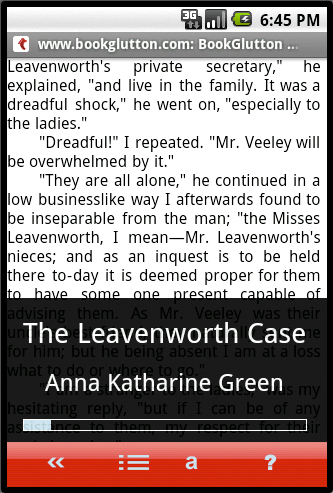
READING ON THE GO On BookGlutton Mobile the maximum space has been cleared for text. Tap the right or left side of the screen to move through the book, tap the center to slide your menu up. Change font size, peruse the Table of Contents, and see where you are in the book.
READING ACROSS DEVICES Log in and pick up where you left off on your laptop for a seamless reading experience across all your devices. Instead of requiring you to download an app, BookGlutton has taken reading into the cloud.

COMMUNITY & COLLECTIONS Access your wall to stay on top of what people want to tell you – we’ve streamlined profile pages so just your wall postings show. You can also get to your friend list to see what books people have been reading

Getting organized for the new year? So are we! Get started by putting together your own COLLECTIONS on BookGlutton. What are COLLECTIONS, you ask? Well, a COLLECTION is a list of books you’ve found on BookGlutton.com.
You’ve already seen COLLECTIONS on the site? Probably. Logging in shows you COLLECTIONS listed in your personal sub-menu. By following that COLLECTIONS link you find your RECENT READS, PURCHASES and FAVORITES (after all, those are lists of books, too). But now you can create and name your own COLLECTIONS, as well. Might I recommend creating a few lists called “Things I Always Meant to Read” or “Stuff My Friends Think Is Awesome” and then adding some books?
Adding something to a COLLECTION is easy, just look for the “Add to COLLECTION” icon on any book detail page. Try it!

We’ve updated our short video on How BookGlutton Works. You can watch it with the link below or via the BookGlutton homepage. In 3.5 minutes it shows how to get around the site, buy stuff, organize yourself, and generally tells you everything you need to know to get started.
Watch the video here.

For the latest, greatest news about BookGlutton.com check out the December Newsletter. We’ve introduced GIFTING, so you can now buy a book and give it to someone else. You can also learn about FAVORITES and COLLECTIONS.
Read it all HERE.

BookGlutton’s playing favorites. Now you can mark any book as a FAVORITE. Once you log in, just click on the star icon on any book detail page and it’ll be added to your FAVORITES LIST. The icon won’t show up until you LOG IN, though…’cause how else will we know who’s favorite it is?
Q: Why would I want to do this?
A: To make your favorites easier to find. Trust us – you’ll be using this a lot once you start reading on multiple platforms.
Q: And how do I get to my FAVORITES list?
A: Easy. Log in and look for your PERSONAL SUBNAV in the PAGE HEADER. Click on COLLECTIONS. Essentially your FAVORITES are just one kind of COLLECTION or book list.
Q: I don’t see a star! Where’d it go?
A: See the part about logging in. A whole slew of stuff will show up on the right, too.

For those of you interested in stats we’ve added another number for you to follow: VIEWS. Now on every book detail page you’ll see two numbers under the book cover, categorized by OPENS and VIEWS. OPENS shows you how many times people have, well, opened and read the thing. VIEWS represents the number of people who’ve looked at the page and considered reading it, but for whatever reason, didn’t.
It’s a nice way to track activity, and of course if people are logged in and reading publicly their profile picture shows up, so you can connect accordingly.

Stand back! We just launched a whole slew of ebooks from Girlebooks on BookGlutton.com. Laura McDonald, owner of Girlebooks, is offering some nicely edited collections of classics as well as a number of originals. Girlebooks aims to make classic and lesser-known works by female writers available to the masses – you can read a ton of them on BookGlutton. So start a group, embed the widget, enjoy the good stuff!
Check out Girlebooks books in our store:
http://www.bookglutton.com/portal/browse/by/publisher/cpid/42
Follow Girlebooks on BookGlutton via their publisher page:
http://www.bookglutton.com/glutton/girlebooks.html
 FrontMatters
Shortcut to Latest Comments
Want to see what people are saying inside a book? Get a feel for it on the book detail page. We now have a LATEST NOTES bar on the right, which pulls out the two most recent public comments. Click on it to get inside the book and say something.